Strefy czasowe podróżowanie z pompami
DanaR, Korean DanaR
Nie ma problemu ze zmianą strefy czasowej w telefonie, ponieważ te pompy nie używają historii
DanaRv2, DanaRS
Te pompy wymagają specjalnej uwagi, ponieważ AndroidAPS używa historii z pompy, ale rekordy w pompie nie mają stempla strefy czasowej. That means if you simple change timezone in phone, records will be read with different timezone and will be doubled.
To avoid this there are two possibilities:
Option 1: Keep home time and timeshift profile
Turn off ‘Automatic date and time’ in your phone settings (manual time zone change).
Phone must keep your standard time as at home for the whole travel period.
Time-shift your profile according to time difference between home time and destination time.
- Long-press profile name (middle of top section on homescreen)
- Select ‘Profile Switch’
- Set ‘Time shift’ according to your destination.
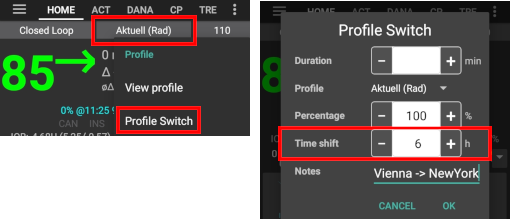
- i.e. Vienna -> New York: profile switch +6 hours
- i.e. Vienna -> Sydney: profile switch -8 hours
Probably not an option if using patched LibreLink app as automatic time zone must be set to start a new Libre 2 sensor.
Option 2: Delete pump history
- Turn off ‘Automatic date and time’ in your phone settings (manual time zone change)
Po wyjściu z samolotu:
- wyłącz pompę
- zmień strefę czasową w telefonie
- wyłącz telefon, włącz pompę
- wyczyść historię w pompie
- zmień czas w pompie
- włącz telefon
- pozwól telefonowi połączyć się z pompą i dostosować czas
Insight
Sterownik automatycznie dostosowuje czas pompy do czasu telefonu.
Insight rejestruje również wpisy historii, w którym momencie zmieniono czas i od którego (starego) czasu, do którego (nowego) czasu. Tak więc poprawny czas można określić w AAPS pomimo zmiany czasu.
Może to powodować niedokładności w TDD. Ale to nie powinno być problemem.
Użytkownik Insight nie musi się martwić o zmiany strefy czasowej i zmiany czasu. Jest jeden wyjątek od tej reguły: pompa Insight ma małą wewnętrzną baterię do zasilania, itp. podczas zmiany głównej baterii. Jeśli wymiana baterii trwa zbyt długo, bateria wewnętrzna może się wyczerpać, zegar zostanie zresetowany, a po włożeniu nowej baterii zostaniesz poproszony o wprowadzenie nowej godziny i daty. W takim przypadku wszystkie wpisy przed wymianą baterii są pomijane w obliczeniach w APPS, ponieważ prawidłowy czas nie może być prawidłowo zidentyfikowany.
Zmiana czasu z i na czas letni (DST)
W zależności od konfiguracji pompy i CGM, skokowe zmiany czasu mogą prowadzić do problemów. Z Combo np. historia pompy zostanie ponownie odczytana i może prowadzić do duplikowania wpisów. Z tego względu przygotuj się wcześniej, w trakcie dnia a nie w nocy.
Jeśli używasz kalkulatora bolusa, nie używaj COB i IOB, chyba że upewnisz się, że są one całkowicie poprawne - lepiej nie używaj ich przez kilka godzin po przełączeniu DST.
Accu-Chek Combo
AndroidAPS will issue an alarm if the time between pump and phone differs too much. In case of DST time adjustment, this would be in the middle of the night. To prevent this and enjoy your sleep instead, follow these steps so that you can force the time change at a time convenient to yourself:
Actions to take before the clock change
- Switch OFF any setting that automatically sets the timezone, so you can force the time change when you want to. How you can do this will depend on your smartphone and Android version.
- Some have two settings, one for automatic setting of the time (which ideally should remain on) and one for automatic setting of the timezone (which you must turn OFF).
- Unfortunately some Android versions have a single switch to enable automatic setting of both the time and the timezone. You’ll have to turn this off for now.
- Find a time zone that has the same time as your current location but doesn’t use DST.
- A list of these countries is available https://greenwichmeantime.com/countries
- For Central European Time (CET) this could be “Brazzaville” (Kongo). Change your phone’s timezone to Kongo.
- In AndroidAPS refresh your pump.
- Check the Treatments tab... If you see any duplicate treatments:
- DON’T press “delete treatments in the future”
- Hit “remove” on all future treatments and duplicate ones. This should invalidate the treatments rather than removing them so they will not be considered for IOB anymore.
- If the situation on how much IOB/COB is unclear - for safety please disable the loop for at least one DIA and Max-Carb-Time - whatever is bigger.*
Actions to take after the clock change
A good time to make this switch would be with low IOB. E.g. an hour before a meal such as breakfast, (any recent boluses in the pump history will have been small SMB corrections. Your COB and IOB should both be close to zero.)
- Change the Android timezone back to your current location and re-enable automatic timezone.
- AndroidAPS will soon start alerting you that the Combo’s clock doesn’t match. So update the pump’s clock manually via the pump’s screen and buttons.
- On the AndroidAPS “Combo” screen, press Refresh.
- Then go to the Treatments screen, and look for any events in the future. There shouldn’t be many.
- DON’T press “delete treatments in the future”
- Hit “remove” on all future treatments and duplicate ones. This should invalidate the treatments rather than removing them so they will not be considered for IOB anymore.
- If the situation on how much IOB/COB is unclear - for safety please disable the loop for at least one DIA and Max-Carb-Time - whatever is bigger.*
- Continue as normal.
Pompa Accu-Chek Insight
- Change to DST is done automatically. No action required.
Other pumps
- This feature is available since AndroidAPS version 2.2.
- To prevent difficulties the Loop will be deactivated for 3 hours AFTER the DST switch. This is done for safety reasons (IOB too high due to duplicated bolus prior to DST change).
- You will receive a notification on the main screen prior to DST change that loop will be disabled temporarily. This message will appear without beep, vibration or anything.