SMS-commando’s
Safety First
- AndroidAPS heeft de optie om de telefoon (van bijvoorbeeld een kind) op afstand te kunnen bedienen via SMS-berichten. Bedenk wel, dat de telefoon die is ingesteld om externe commando’s te geven, kan worden gestolen. Beveilig die telefoon dus goed, met op z’n minst een pincode. A strong password or biometrics are recommended.
- Additionally it is recommended to allow a second phone number for SMS commands. So you can use second number to temporary disable SMS communicator in case your main remote phone gets lost or stolen.
- Nadat jouw externe commando (bijv. bolus geven, profiel aanpassen) is uitgevoerd, zal AndroidAPS een bevestigings-SMS sturen. Het wordt aangeraden om ten minste 2 telefoonnummers te koppelen in de SMS communicator instellingen. Mocht één van de gekoppelde telefoons worden gestolen, dan zul je deze bevestigings-SMS’jes evengoed nog op het tweede telefoonnummer binnenkrijgen.
- Als je bolus via SMS commando’s gebruikt, moet je koolhydraten invoeren via Nightscout (NSClient, Website...)! Als je dit niet doet, dan zou IOB correct zijn met te weinig COB waardoor de correctie bolus mogelijk niet zal worden uitgevoerd, aangezien AAPS ervan uitgaat dat je al te veel actieve insuline hebt.
- As of AndroidAPS version 2.7 an authenticator app with a time-based one-time password must be used to increase safety when using SMS commands.
Setup SMS commands
- De meeste aanpassingen zoals tijdelijke streefdoelen, AAPS volgen etc. can be done on NSClient app on an Android phone with an internet connection.
- Bolussen kunnen niet worden gegeven via Nightscout, maar u kunt wel SMS-opdrachten gebruiken.
- If you use an iPhone as a follower and therefore cannot use NSClient app, there are additional SMS commands available.
- Ga bij een Android telefoon bij instellingen naar Applicaties > AndroidAPS > Machtigingen en schakel SMS in
Authorized phone numbers
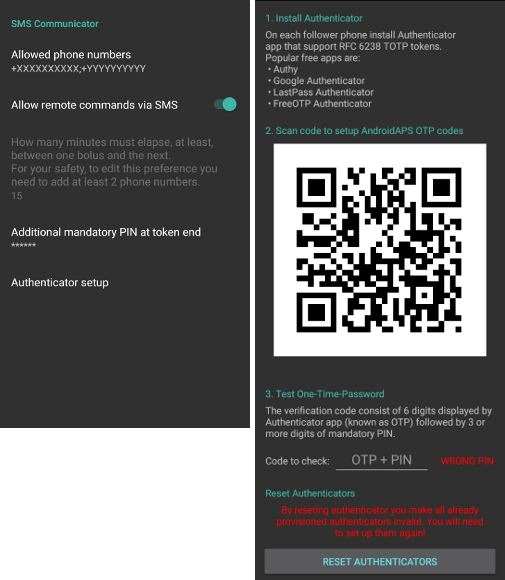
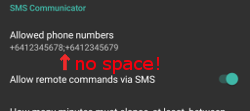
In AndroidAPS go to Preferences > SMS Communicator and enter the phone number(s) that you will allow SMS commands to come from (separated by semicolons - i.e. +6412345678;+6412345679)
Enable ‘Allow remote commands via SMS’.
Als je meer dan één nummer wilt gebruiken:
Voer slechts één nummer in.
Zorg dat dat enkele nummer werkt door het verzenden en het bevestigen van een SMS-commando.
Geef extra nummer(s) op, gescheiden door puntkomma, geen spatie.
Minutes between bolus commands
- You can define the minimum delay between two boluses issued via SMS.
- For safety reasons you have to add at least two authorized phone numbers to edit this value.
Additionally mandatory PIN at token end
For safety reasons the reply code must be followed by a PIN.
PIN rules:
- 3 to 6 digits
- not same digits (i.e. 1111)
- not in a row (i.e. 1234)
Authenticator setup
Two-factor authentication is used to improve safety.
You can use any Authenticator app that supports RFC 6238 TOTP tokens. Popular free apps are:
- Authy
- Google Authenticator - Android / iOS
- LastPass Authenticator
- FreeOTP Authenticator
Install the authenticator app of your choice on your follower phone and scan the QR code shown in AAPS.
Test the one-time password by entering the token shown in your authenticator app and the PIN you just setup in AAPS. Voorbeeld:
- Your mandatory PIN is 2020
- TOTP token from the authenticator app is 457051
- Enter 4570512020
The red text “WRONG PIN” will change automatically to a green “OK” if the entry is correct. There is no button you can press!
The time on both phones must be synchronized. Best practice is set automatically from network. Time differences might lead to authentication problems.
Use button “RESET AUTHENTICATORS” if you want to remove provisioned authenticators. (By resetting authenticator you make ALL already provisioned authenticators invalid. You will need to set them up again)
Use SMS commands
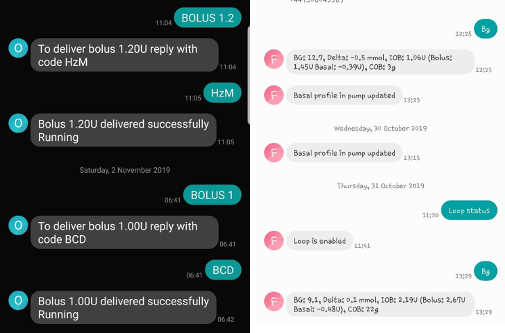
Send a SMS to the phone with AndroidAPS running from your approved phone number(s) using any of the commands below.
The AAPS phone will respond to confirm success of command or status requested.
Confirm command by sending the code where necessary. Voorbeeld:
- Your mandatory PIN is 2020
- TOTP token from the authenticator app is 457051
- Enter 4570512020
Hint: It can be useful to have unlimited SMS on your phone plan (for each phone used) if a lot of SMS will be sent.
Commando‘s
Commands must be sent in English, the response will be in your local language if the response string is already translated.
Loop
- LOOP STOP/DISABLE
- Reactie: Loop is uitgeschakeld (disabled)
- LOOP START/ENABLE
- Reactie: Loop is ingeschakeld (enabled)
- LOOP STATUS
- De respons is afhankelijk van de werkelijke status:
- Loop is uitgeschakeld (disabled)
- Loop is ingeschakeld (enabled)
- Gepauzeerd (10 min)
- LOOP SUSPEND 20
- Reactie: Loop wordt onderbroken gedurende 20 minuten (Loop suspended for 20 minutes)
- LOOP RESUME
- Reactie: Loop hervat (resumed)
CGM gegevens
- BG
- Reactie: Laatste BG: 5.6 4min geleden, Delta: -0,2 mmol, IOB: 0.20U (Bolus: 0.10U Basaal: 0.10U)
- CAL 5.6
- Response: To send calibration 5.6 reply with code from Authenticator app for User followed by PIN
- Reactie na correcte code ontvangen: Calibration verzonden (Als xDrip is geïnstalleerd. In de xDrip+ instellingen moet je aangevinkt hebben dat kalibraties van volgers geaccepteerd worden)
Basaal
- BASAL STOP/CANCEL
- Response: To stop temp basal reply with code from Authenticator app for User followed by PIN
- BASAL 0.3
- Response: To start basal 0.3U/h for 30 min reply with code from Authenticator app for User followed by PIN
- BASAL 0.3 20
- Response: To start basal 0.3U/h for 20 min reply with code from Authenticator app for User followed by PIN
- BASAL 30%
- Response: To start basal 30% for 30 min reply with code from Authenticator app for User followed by PIN
- BASAL 30% 50
- Response: To start basal 30% for 50 min reply with code from Authenticator app for User followed by PIN
Bolus
Remote bolus is not allowed within 15 min (this value is editable only if 2 phone numbers added) after last bolus command or remote commands! Therefore the response depends on the time that the last bolus was given.
- BOLUS 1.2
- Response A: To deliver bolus 1.2U reply with code from Authenticator app for User followed by PIN
- Reactie B: Externe bolus niet beschikbaar. Probeer het later opnieuw.
- BOLUS 0.60 MEAL
- Als je de optionele parameter MEAL opgeeft, dan wordt het tijdelijke streefdoel “eet binnenkort” ingesteld (standaard waarden zijn: 90 mg/dL, 5.0 mmol/l voor 45 min).
- Response A: To deliver meal bolus 0.60U reply with code from Authenticator app for User followed by PIN
- Reactie B: Externe bolus niet beschikbaar.
- CARBS 5
- Response: To enter 5g at 12:45 reply with code from Authenticator app for User followed by PIN
- CARBS 5 17:35/5:35PM
- Response: To enter 5g at 17:35 reply with code from Authenticator app for User followed by PIN
- EXTENDED STOP/CANCEL
- Response: To stop extended bolus reply with code from Authenticator app for User followed by PIN
- EXTENDED 2 120
- Response: To start extended bolus 2U for 120 min reply with code from Authenticator app for User followed by PIN
Profiel
- PROFILE STATUS
- Reactie: Profiel1
- PROFILE LIST
- Reactie: 1.`Profiiel1` 2.`Profiel2`
- PROFILE 1
- Response: To switch profile to Profile1 100% reply with code from Authenticator app for User followed by PIN
- PROFILE 2 30
- Response: To switch profile to Profile2 30% reply with code from Authenticator app for User followed by PIN
Andere
- TREATMENTS REFRESH
- Reactie: Haal behandelingen op van NS
- NSCLIENT RESTART
- Reactie: NSCLIENT RESTART 1 ontvangers
- PUMP
- Response: Last conn: 1 min ago Temp: 0.00U/h @11:38 5/30min IOB: 0.5U Reserv: 34U Batt: 100
- PUMP CONNECT
- Response: Pump reconnected
- PUMP DISCONNECT 30
- Response: To disconnect pump for 30 minutes reply with code from Authenticator app for User followed by PIN
- SMS DISABLE/STOP
- Reactie: Om de SMS Remote Service uit te schakelen, antwoord met code Any. Houd er rekening mee dat je het gebruik van SMS commando’s alleen direct vanaf de AAPS master smartphone kunt heractiveren.
- TARGET MEAL/ACTIVITY/HYPO
- Response: To set the Temp Target MEAL/ACTIVITY/HYPO reply with code from Authenticator app for User followed by PIN
- TARGET STOP/CANCEL
- Response: To cancel Temp Target reply with code from Authenticator app for User followed by PIN
- HELP
- Reactie: BG, LOOP, BEHANDELINGEN, .....
- HELP BOLUS
- Reactie: BOLUS 1.2 BOLUS 1.2 MAALTIJD
Problemen oplossen
Meerdere SMS
Als je hetzelfde bericht steeds opnieuw ontvangt (d.w.z. profiel wissel) dan heb je waarschijnlijk een cirkel gemaakt met andere apps. Dit kan bijvoorbeeld xDrip+ zijn. If so, please make sure that xDrip+ (or any other app) does not upload treatments to NS.
If the other app is installed on multiple phones make sure to deactivate upload on all of them.
SMS-commando’s doen het niet op mijn Samsung, wat nu?
Er is een melding gemaakt van SMS-commando’s die niet meer werkten na een update op een Galaxy S10 telefoon. Could be solved by disabling ‘send as chat message’.
