SMS příkazy
Bezpečnost především
- AndroidAPS vám umožňuje kontrolovat telefon vašeho dítěte na dálku prostřednictvím textových zpráv. Pokud povolíte SMS komunikátor, vždy pamatujte na to, že telefon nastavený k vydávání vzdálených příkazů, může být ukraden. Proto vždy chraňte telefon alespoň pomocí kódu PIN. A strong password or biometrics are recommended.
- Additionally it is recommended to allow a second phone number for SMS commands. So you can use second number to temporary disable SMS communicator in case your main remote phone gets lost or stolen.
- Systém AndroidAPS vás rovněž bude informovat textovou zprávou o tom, jestli váš vzdálený příkaz, např. bolus nebo změna profilu, byl proveden. Je proto vhodné nastavit, aby byly potvrzovací zprávy odesílány alespoň na dvě různá telefonní čísla pro případ, že by došlo ke zcizení jednoho z rodičovských telefonů.
- Pokud jste zadali bolus prostřednictvím SMS příkazů, musíte přes Nightscout (NSClient, webovou stránku...) zadat odpovídající množství sacharidů! Jestliže to neuděláte, bude IOB kalkulováno oproti nízkému COB. Případný korekční bolus pak nemusí být vydán, protože AAPS předpokládá, že máte příliš mnoho aktivního inzulínu.
- As of AndroidAPS version 2.7 an authenticator app with a time-based one-time password must be used to increase safety when using SMS commands.
Setup SMS commands
- Většinu úprav dočasných cílů, se kterými pracuje AAPS apod., can be done on NSClient app on an Android phone with an internet connection.
- Bolusy přes Nightscout nepošlete. Můžete to ale provést pomocí SMS příkazů.
- If you use an iPhone as a follower and therefore cannot use NSClient app, there are additional SMS commands available.
- Ve vašem Android telefonu přejděte do jeho systémového nastavení, následně do Aplikace > AndroidAPS > Oprávnění a povolte SMS
Authorized phone numbers
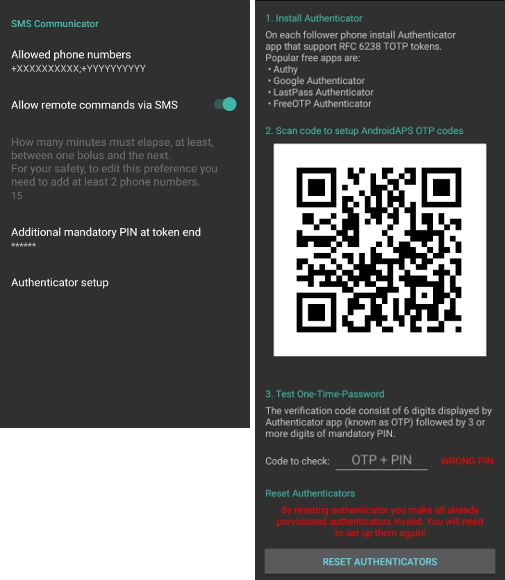
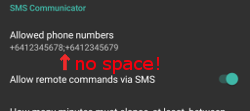
In AndroidAPS go to Preferences > SMS Communicator and enter the phone number(s) that you will allow SMS commands to come from (separated by semicolons - i.e. +6412345678;+6412345679)
Enable ‘Allow remote commands via SMS’.
Chcete-li nastavit více než jedno číslo:
Zadejte pouze jedno číslo.
Ujistěte se, že první číslo funguje - zasláním SMS příkazu a jeho potvrzením.
Přidejte další číslo(a) oddělené středníkem, bez mezery.
Minutes between bolus commands
- You can define the minimum delay between two boluses issued via SMS.
- For safety reasons you have to add at least two authorized phone numbers to edit this value.
Additionally mandatory PIN at token end
For safety reasons the reply code must be followed by a PIN.
PIN rules:
- 3 to 6 digits
- not same digits (i.e. 1111)
- not in a row (i.e. 1234)
Authenticator setup
Two-factor authentication is used to improve safety.
You can use any Authenticator app that supports RFC 6238 TOTP tokens. Popular free apps are:
- Authy
- Google Authenticator - Android / iOS
- LastPass Authenticator
- FreeOTP Authenticator
Install the authenticator app of your choice on your follower phone and scan the QR code shown in AAPS.
Test the one-time password by entering the token shown in your authenticator app and the PIN you just setup in AAPS. Příklad:
- Your mandatory PIN is 2020
- TOTP token from the authenticator app is 457051
- Enter 4570512020
The red text “WRONG PIN” will change automatically to a green “OK” if the entry is correct. There is no button you can press!
The time on both phones must be synchronized. Best practice is set automatically from network. Time differences might lead to authentication problems.
Use button “RESET AUTHENTICATORS” if you want to remove provisioned authenticators. (By resetting authenticator you make ALL already provisioned authenticators invalid. You will need to set them up again)
Use SMS commands
Send a SMS to the phone with AndroidAPS running from your approved phone number(s) using any of the commands below.
The AAPS phone will respond to confirm success of command or status requested.
Confirm command by sending the code where necessary. Příklad:
- Your mandatory PIN is 2020
- TOTP token from the authenticator app is 457051
- Enter 4570512020
Hint: It can be useful to have unlimited SMS on your phone plan (for each phone used) if a lot of SMS will be sent.
Příkazy
Commands must be sent in English, the response will be in your local language if the response string is already translated.
Smyčka
- LOOP STOP/DISABLE
- Odpověď: Smyčka byla zakázána
- LOOP START/ENABLE
- Odpověď: Smyčka byla povolena
- LOOP STATUS
- Odpověď záleží na aktuálním stavu
- Smyčka je zakázána
- Smyčka je povolena
- Pozastavena (10 minut)
- LOOP SUSPEND 20
- Odpověď: Smyčka pozastavena na 20 minut
- LOOP RESUME
- Odpověď: Smyčka obnovena
CGM data
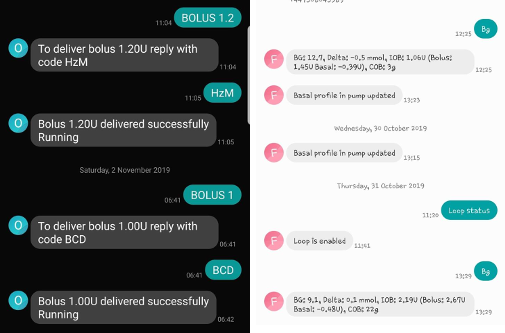
- BG
- Odpověď: poslední BG: 5.6 před 4min Delta: -0,2 mmol, IOB: 0.20U (Bolus: 0.10U Bazál: 0.10U)
- CAL 5.6
- Response: To send calibration 5.6 reply with code from Authenticator app for User followed by PIN
- Odpověď po přijetí správného potvrzovacího kódu: Kalibrace odeslána (je-li instalovaný xDrip. V xDrip+ musí být povolen příjem kalibrací*)
Bazál
- BASAL STOP/CANCEL
- Response: To stop temp basal reply with code from Authenticator app for User followed by PIN
- BASAL 0.3
- Response: To start basal 0.3U/h for 30 min reply with code from Authenticator app for User followed by PIN
- BASAL 0.3 20
- Response: To start basal 0.3U/h for 20 min reply with code from Authenticator app for User followed by PIN
- BASAL 30%
- Response: To start basal 30% for 30 min reply with code from Authenticator app for User followed by PIN
- BASAL 30% 50
- Response: To start basal 30% for 50 min reply with code from Authenticator app for User followed by PIN
Bolus
Remote bolus is not allowed within 15 min (this value is editable only if 2 phone numbers added) after last bolus command or remote commands! Therefore the response depends on the time that the last bolus was given.
- BOLUS 1.2
- Response A: To deliver bolus 1.2U reply with code from Authenticator app for User followed by PIN
- Odpověď B: Vzdálený bolus není k dispozici. Zkuste to později.
- BOLUS 0.60 MEAL
- Zadáte-li volitelný parametr MEAL, nastaví se dočasný cíl PŘED JÍDLEM (výchozí hodnoty jsou: 90 mg/dL, 5,0 mmol/l na 45 minut).
- Response A: To deliver meal bolus 0.60U reply with code from Authenticator app for User followed by PIN
- Odpověď B: Vzdálený bolus není k dispozici.
- CARBS 5
- Response: To enter 5g at 12:45 reply with code from Authenticator app for User followed by PIN
- CARBS 5 17:35/5:35PM
- Response: To enter 5g at 17:35 reply with code from Authenticator app for User followed by PIN
- EXTENDED STOP/CANCEL
- Response: To stop extended bolus reply with code from Authenticator app for User followed by PIN
- EXTENDED 2 120
- Response: To start extended bolus 2U for 120 min reply with code from Authenticator app for User followed by PIN
Profil
- PROFILE STATUS
- *Odpověď: Profile1
- PROFILE LIST
- Odpověď : 1.`Profile1` 2.`Profile2`
- PROFILE 1
- Response: To switch profile to Profile1 100% reply with code from Authenticator app for User followed by PIN
- PROFILE 2 30
- Response: To switch profile to Profile2 30% reply with code from Authenticator app for User followed by PIN
Jiné
- TREATMENTS REFRESH
- Odpověď: Obnovit ošetření z NS
- NSCLIENT RESTART
- Odpověď: NSCLIENT RESTART 1 příjemce
- PUMP
- Response: Last conn: 1 min ago Temp: 0.00U/h @11:38 5/30min IOB: 0.5U Reserv: 34U Batt: 100
- PUMP CONNECT
- Response: Pump reconnected
- PUMP DISCONNECT 30
- Response: To disconnect pump for 30 minutes reply with code from Authenticator app for User followed by PIN
- SMS DISABLE/STOP
- Odpověď: Pro vypnutí vzdálené SMS služby odpovězte pomocí SMS s kódem Any. Mějte na paměti, že ji budete moci opětovně reaktivovat pouze z hlavního smartphonu s AAPS.
- TARGET MEAL/ACTIVITY/HYPO
- Response: To set the Temp Target MEAL/ACTIVITY/HYPO reply with code from Authenticator app for User followed by PIN
- TARGET STOP/CANCEL
- Response: To cancel Temp Target reply with code from Authenticator app for User followed by PIN
- HELP
- Odpověď: BG, LOOP, TREATMENTS, .....
- HELP BOLUS
- Odpověď: BOLUS 1.2 BOLUS 1.2 MEAL
Poradce při potížích
Duplicitní SMS
Obdržíte-li stejnou zprávu znovu a znovu (např. přepnutí profilu), je pravděpodobné, že se jedná o zacyklení s jinými aplikacemi. Například xDrip+. If so, please make sure that xDrip+ (or any other app) does not upload treatments to NS.
If the other app is installed on multiple phones make sure to deactivate upload on all of them.
Nefunkční SMS příkazy na telefonech Samsung
Po aktualizaci telefonu Galaxy S10 bylo hlášeno, že SMS příkazy přestaly fungovat. Could be solved by disabling ‘send as chat message’.
