Ogólne zasady używania systemów CGM
Higiena CGM == == == == == == == == == == == == == == == == == == == == == == == == == == == == == == == == == == == == == == ==
Niezależnie od tego, jakiego systemu CGM używasz, jeśli zamierzasz korzystać z kalibracji opartej na krwi, istnieją pewne bardzo jasne zasady, które powinieneś zastosować, niezależnie od tego, czy używasz oprogramowania DIY CGM, czy oficjalnych aplikacji.
- Upewnij się, że ręce i akcesoria do glukometru są czyste.
- Try to calibrate when you have a series of dots with a flat arrow (15-30 minutes is usually enough)
- Unikaj kalibracji, gdy poziom glukozy zmienia się w górę lub w dół.
- W oficjalnych systemach CGM wykonaj „wymaganą” kalibrację - w aplikacjach pojawi się monit o sprawdzenie BG raz lub dwa razy dziennie. W systemach DIY możesz nie być poproszony/poproszona o wykonanie kalibracji i powinieneś/powinnaś uważać na kontynuowanie pracy systemu bez kalibracji.
- Jeśli to możliwe, wykonaj kalibrację z niektórymi odczytami w niższym zakresie (4–5 mmoli / l lub 72–90 mg / dl), a niektóre na nieco wyższym poziomie (7-9 mmoli / l lub 126–160 mg / dl), taki sposób wykonania kalibracji zapewni lepszy zakres dla kalibracji punkt / nachylenie.
Setting sensor (G6) == == == == == == == == == == == == == == == == == == == == == == == == == == == == == == == == == == == == == == ==
When setting sensor, it is recommended not to press the inserter too firmly in order to avoid bleeding. The sensor thread should not come into contact with blood.
After setting the sensor, the transmitter can be clicked into the sensor holder. Caution! First click in the square side and then press down the round side.
Rozwiązywanie problemów == == == == == == == == == == == == == == == == == == == == == == == == == == == == == == == == == == == == == == ==
Connection problems
Bluetooth connection may be disturbed by other nearby Bluetooth devices such as blood glucose meters, headsets, tablets or kitchen devices such as microwave ovens or ceramic hobs. In this case xdrip does not display any BG values. When bluetooth connection is reestablished the data is backfilled.
Sensor Errors
If recurring sensor errors occur try selecting a different body site to set your sensor. The sensor thread should not come into contact with blood.
Often a “Sensor Error” can be corrected by immediate drinking and massage around the sensor!
Jumpy values
You might try to change settings for noise blocking in xdrip (Settings - Inter-App Settings - Noise Blocking) i.e. “Block Very High noise and worse”. See also Smoothing BG data.
Negative Sensor Age
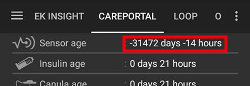
This occurs if there is either a double “CGM Sensor Insert” entry in actions tab / menu or a sensor insert with wrong date. Go to treatments tab > careportal and delete the wrong entry.