Wisselen van tijdzone
DanaR, Koreaanse DanaR
Het wijzigen van de tijdzone in de telefoon is geen probleem omdat de pompgeschiedenis niet wordt gebruikt.
DanaRv2, DanaRS
Deze pompen hebben een speciale behandeling nodig omdat AndroidAPS geschiedenis uit de pomp gebruikt, maar de opgeslagen informatie in de pomp heeft geen tijdszone-notering. Dat betekent dat als je simpelweg de tijdzone wijzigt in je telefoon, de pompgeschiedenis zal worden uitgelezen met een andere tijdzone en daardoor behandelingen dubbel in AndroidAPS terechtkomen.
Om dit te voorkomen zijn er twee mogelijkheden:
Optie 1: Houd de tijdzone van thuis en doe een tijdverschuiving van je profiel
Schakel ‘Automatische datum en tijd’ uit in je telefooninstellingen (handmatige tijdzonewijziging).
Jouw telefoon moet op de standaard tijd van jouw thuisland blijven staan gedurende de hele reisperiode.
Doe een tijdverschuiving van jouw profiel op basis van het tijdverschil tussen je thuisland en je reisbestemming.
- Houd jouw profiel naam (bovenaan in het midden van jouw Overzicht-scherm) lang ingedrukt
- Kies ‘Profiel Wissel’
- Stel ‘Tijdverschuiving’ in die hoort bij jouw reisbestemming.
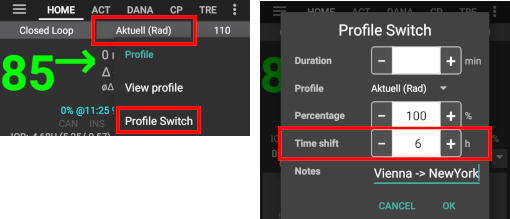
- Bijvoorbeeld Wenen-> New York: profiel wissel + 6 uur
- Bijvoorbeeld Wenen-> Sydney: profiel wissel - 8 uur
Let op: dit is waarschijnlijk niet mogelijk als je gebruik maakt van de gepatchte LibreLink app omdat je telefoon op ‘automatische tijdzone’ moet staan om een nieuwe Libre 2 sensor te starten.
Optie 2: pomphistorie wissen
- Schakel ‘Automatische datum en tijd’ uit in je telefooninstellingen (handmatige tijdzonewijziging)
Wanneer je uit het vliegtuig komt:
- zet pomp uit
- wijzig tijdzone op je telefoon
- telefoon uitschakelen, pomp aanzetten
- geschiedenis wissen in pomp
- verander tijd in pomp
- telefoon aanzetten
- laat telefoon verbinding maken met de pomp en de tijd fine-tunen
Insight
Het stuurprogramma van de pomp past automatisch de tijd van de pomp aan op de tijd van de telefoon.
Het Insight slaat ook in de pompgeschiedenis op wanneer de tijd is veranderd en ook van welke (oude) tijd naar welke (nieuwe) tijd. Dus kan de juiste tijd worden bepaald in AAPS, ondanks de tijdsaanpassing.
Het kan wel tot onnauwkeurigheden leiden in de TDD (totale dagelijkse dosis). Maar dat zou geen probleem moeten zijn.
Gebruikers van de Insight hebben het dus makkelijk bij tijdzone aanpassingen, omdat het pompgeheugen rekening houdt met tijdswisselingen. Wel heeft dit een ander nadeel: de pomp heeft een kleine interne batterij die o.a. de tijd bijhoudt terwijl jij de “gewone” batterij verwisselt. Als het wisselen van de batterij te lang duurt, kan deze interne batterij leegraken. Dan wordt de interne klok gereset en wordt je gevraagd een nieuwe tijd en datum in te voeren nadat je een nieuwe batterij in de pomp hebt gedaan. In dit geval negeert AAPS alle informatie in het pompgeheugen voorafgaand aan de batterijwissel voor zijn berekeningen, omdat de juiste tijd niet goed kan worden bepaald.
Wisselen tussen zomer- en wintertijd
Afhankelijk van pomp en CGM setup, kunnen tijdsverschuivingen problemen geven. Met de Combo bijv. wordt de pompgeschiedenis opnieuw uitgelezen en dat kan leiden tot dubbele invoer. Zorg dus dat je deze wissel uitvoert wanneer je wakker bent, laat het niet automatisch gebeuren gedurende de nacht. Hiermee voorkom je probemen.
Als je de boluscalculator gebruikt, haal dan de vinkjes weg bij COB en IOB tenzij je ervoor zorgt dat ze absoluut correct zijn - gebruik ze beter niet gedurende de eerste paar uur na een tijdswissel.
Accu-Chek Combo
AndroidAPS will issue an alarm if the time between pump and phone differs too much. In case of DST time adjustment, this would be in the middle of the night. To prevent this and enjoy your sleep instead, follow these steps so that you can force the time change at a time convenient to yourself:
Actions to take before the clock change
- Switch OFF any setting that automatically sets the timezone, so you can force the time change when you want to. How you can do this will depend on your smartphone and Android version.
- Some have two settings, one for automatic setting of the time (which ideally should remain on) and one for automatic setting of the timezone (which you must turn OFF).
- Unfortunately some Android versions have a single switch to enable automatic setting of both the time and the timezone. You’ll have to turn this off for now.
- Find a time zone that has the same time as your current location but doesn’t use DST.
- A list of these countries is available https://greenwichmeantime.com/countries
- For Central European Time (CET) this could be “Brazzaville” (Kongo). Change your phone’s timezone to Kongo.
- In AndroidAPS refresh your pump.
- Check the Treatments tab... If you see any duplicate treatments:
- DON’T press “delete treatments in the future”
- Hit “remove” on all future treatments and duplicate ones. This should invalidate the treatments rather than removing them so they will not be considered for IOB anymore.
- If the situation on how much IOB/COB is unclear - for safety please disable the loop for at least one DIA and Max-Carb-Time - whatever is bigger.*
Actions to take after the clock change
A good time to make this switch would be with low IOB. E.g. an hour before a meal such as breakfast, (any recent boluses in the pump history will have been small SMB corrections. Your COB and IOB should both be close to zero.)
- Change the Android timezone back to your current location and re-enable automatic timezone.
- AndroidAPS will soon start alerting you that the Combo’s clock doesn’t match. So update the pump’s clock manually via the pump’s screen and buttons.
- On the AndroidAPS “Combo” screen, press Refresh.
- Then go to the Treatments screen, and look for any events in the future. There shouldn’t be many.
- DON’T press “delete treatments in the future”
- Hit “remove” on all future treatments and duplicate ones. This should invalidate the treatments rather than removing them so they will not be considered for IOB anymore.
- If the situation on how much IOB/COB is unclear - for safety please disable the loop for at least one DIA and Max-Carb-Time - whatever is bigger.*
- Continue as normal.
Accu-Chek Insight
- Change to DST is done automatically. No action required.
Other pumps
- This feature is available since AndroidAPS version 2.2.
- To prevent difficulties the Loop will be deactivated for 3 hours AFTER the DST switch. This is done for safety reasons (IOB too high due to duplicated bolus prior to DST change).
- You will receive a notification on the main screen prior to DST change that loop will be disabled temporarily. This message will appear without beep, vibration or anything.