DanaRS pomp
Deze instructies zijn voor het instellen van de app en pomp, en gelden voor een DanaRS uit 2017 of jonger. Als je een oudere pomp hebt, ga dan naar de instructies voor de DanaR insulinepomp.
New Dana RS firmware v3 can be used from AndroidAPS version 2.7 onwards.
- In DanaRS pump “BASAL A” is used by the app. Existing data gets overwritten.
Pairing pump
In AndroidAPS go to Config Builder and select ‘DanaRS’
Tik op de 3 stipjes in de rechter bovenhoek van het AAPS Overzicht-scherm. Kies Instellingen.
Select DanaRS Pair New Pump, and click your DanaRS serial number.
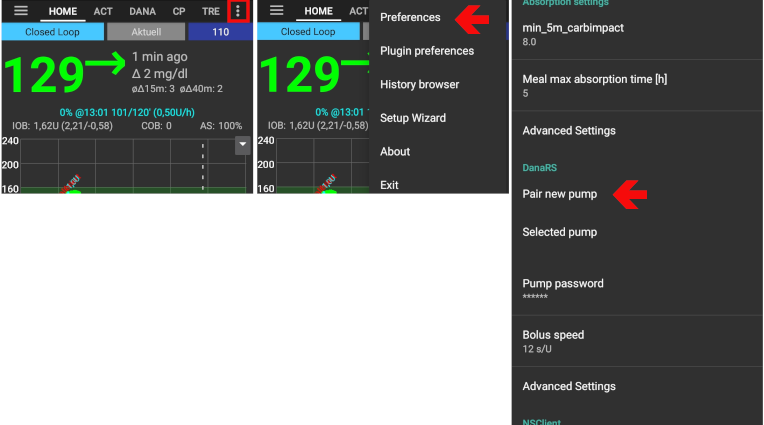
Select Pump password and input your password.
Default password
For DanaRS with firmware v1 and v2 the default password is 1234.
For DanaRS with firmware v3 the default password is a combination of production month and production date (i.e. month 01 and day 24). Open main menu on pump > review > information. Number 3 is production date.
You have to confirm the pairing on the pump! That’s just the way you are used to from other bluetooth pairings (i.e. smartphone and car audio).
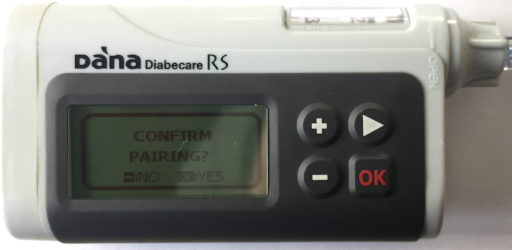
Select Bolus Speed to change the default bolus speed used (12sec per 1u, 30sec per 1u or 60sec per 1u).
Restart your phone.
Set basal step on pump to 0.01 U/h using Doctors menu (see pump user guide)
Activeer vertraagde bolussen op de pomp
Change password on pump
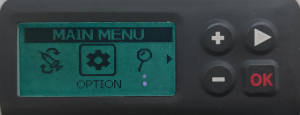
Press OK button on pump
In main menu select “OPTION” (move right by pressing arrow button several times)
In options menu select “USER OPTION”

Use arrow button to scroll down to “11. password”
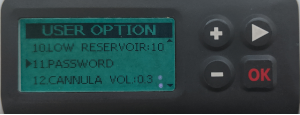
Press OK to enter old password.
Enter old password (Default password see above) and press OK
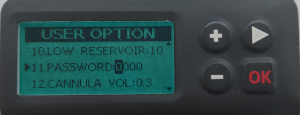
If wrong password is entered here there will be no message indicating failure!
Set new password (Change numbers with + & - buttons / Move right with arrow button).

Confirm with OK button.
Save by pressing OK button again.
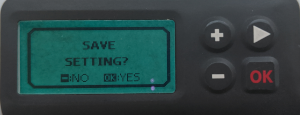
Move down to “14. EXIT” and press OK button.

Dana RS specific errors
Error during insulin delivery
In het geval dat de verbinding tussen AAPS en DanaRS wordt verbroken tijdens het toedienen van een bolus (d.w.z. als je wegloopt van je telefoon terwijl DanaRS bezig is insuline te geven) dan zul je het volgende bericht zien en een alarmgeluid horen.
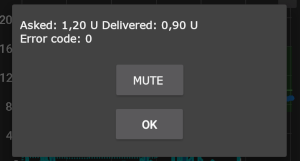
- In most cases this is just a communication issue and the correct amount of insulin is delivered.
- Check in pump history (either on the pump or through Dana tab > pump history > boluses) if correct bolus is given.
- Delete error entry in treatments tab if you wish.
- Real amount is read and recorded on next connect. To force this press BT icon on dana tab or just wait for next connect.
Special note when switching phone
Wanneer je een nieuwe telefoon gaat gebruiken, moet je dat doen via de volgende stappen:
- Export settings on your old phone
- Transfer settings from old to new phone
- Manually pair Dana RS with the new phone
- As pump connection settings are also imported AAPS on your new phone will already “know” the pump and therefore not start a bluetooth scan. Therefore new phone and pump must be paired manually.
- Install AndroidAPS on the new phone.
- Import settings on your new phone
Timezone traveling with Dana RS pump
Lees alles over reizen in verschillende tijdzones op de pagina Wisselen van tijdzone.