Freestyle Libre 2
Freestyle Libre 2 sistema gali automatiškai pranešti apie pavojingus kraujo gliukozės kiekius kraujyje. Libre 2 jutiklis siunčia gliukozės kiekio kraujyje duomenis į imtuvą (skaitytuvą ar išmanųjį telefoną) kiekvieną minutę. Imtuvas įjungia pavojaus signalą, jeigu reikia. With a self-modified LibreLink app and the xDrip+ app, you can continuously receive and display your blood sugar level on your smartphone.
The sensor can be calibrated in the range of -40 mg/dl to +20 mg/dl (-2,2 mmol/l to +1,1 mmol/l) to adjust differences between finger prick measurements and sensor readings.
BG readings can also be done using a BT transmitter like with the Libre1.
Important note : This does not work with the US version of the Freestyle 2 sensor ! The US version will only connect to a reader, not a phone.
Step 1: Build your own patched LibreLink-App
Dėl teisinių priežasčių, taip vadinamas “pataisymas” turi būti atliekamas jūsų paties. Naudokite paieškos sistemas, norėdami rasti atitinkamas nuorodas. There are mainly two variants: The recommended original patched app blocks any internet traffic to avoid tracking. The other variant supports LibreView which may be needed by your doctor.
The patched app has to be installed instead of the original app. The next sensor started with it will transmit the current BG values to the xDrip+ app running on your smartphone via Bluetooth.
Important: To avoid possible problems it may help to first install and uninstall the original app on an NFC capable smartphone. NFC turi būti įjungtas. Tai neeikvoja baterijos. Then install the patched app.
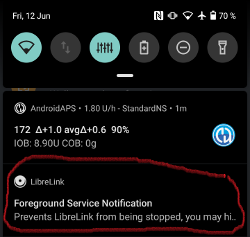
The patched app can be identified by the foreground authorization notification. The foreground authorization service improves the connection stability compared to the original app which do not use this service.
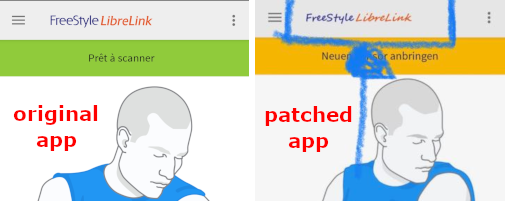
Other indications could be the Linux penguin logo three dot menu -> Info or the font of the patched app. These criteria are optional depending on the app source you choose.
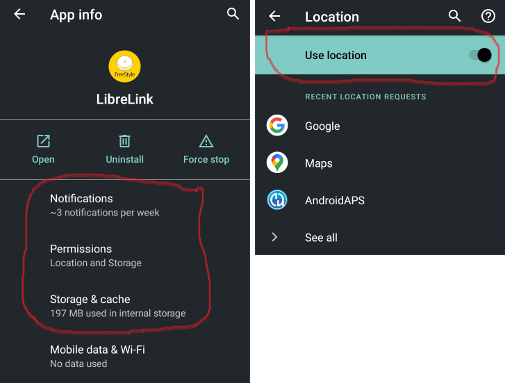
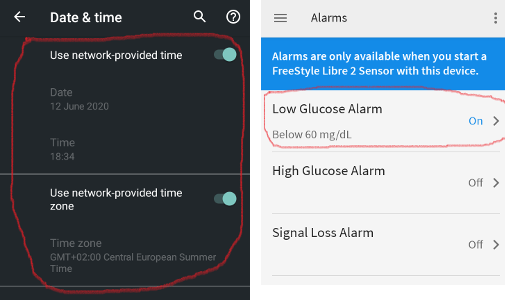
Ensure that NFC is activated, enable the memory and location permission for the patched app, enable automatic time and time zone and set at least one alarm in the patched app.
Dabar aktyvuokite Libre 2 jutiklį su modifikuota progrmėle, tiesiog skenuodami jutiklį. Ensure to have set all settings done.
Privalomi parametrai norint sėkmingai aktyvuoti jutiklį:
- NFC įjungtas / BT įjungtas
- memory and location permission enabled
- location service enabled
- automatic time and time zone setting
- nustatytas bent vieną aliarmas modifikuotoje programėlėje
Please note that the location service is a central setting. This is not the app location permission which has to be set also!
The sensor remembers the device it was started from. Tik šis prietaisas gali priimti signalus ateityje.
Pirmas ryšio nustatymas su jutikliu yra ypač svarbus. LibreLink programėlė bando užmegzti belaidį ryšį su jutikliu kas 30 sekundžių. Jei trūksta vieno ar kelių privalomų parametrų, jie turi būti koreguojami. Galite tai atlikti bet kuriuo metu. Jutiklis nuolat bando nustatyti ryšį. Net jei tai trunka keletą valandų. Be patient and try different settings before even think of changing the sensor.
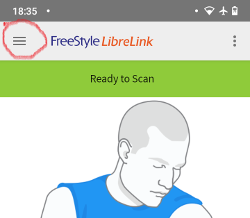
As long as you see a red exclamation mark (”!”) on the upper left corner of the LibreLink’s start screen there is no connection or some other setting blocks LibreLink to signal alarms. Please check if the sound is enabled and all sorts of blocking app notifications are disabled. When the exclamation mark is gone, the connection should be established and blood sugar values are sent to the smartphone. Tai turėtų įvykti daugiausiai po 5 minučių.
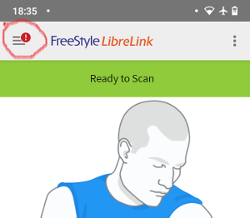
Jei šauktukas lieka arba gaunate klaidos pranešimą, tai gali būti dėl keletos priežasčių:
- Android vietos nustatymo paslauga nėra įgalinta - prašome įjungti tai sistemos nustatymuose
- automatic time and time zone not set - please change the settings accordingly
- įjunkite aliarmus - bent vienas iš trijų aliarmų turi būti įjungtas LibreLink
- Bluetooth yra išjungtas - įjunkite
- sound is blocked
- app notifications are blocked
- idle screen notifications are blocked
- you have a faulty Libre 2 sensor from a production LOT number with a ‘K’ followed by 8 digits. You find this printed on the yellow package. These sensors have to be replaced as they don’t function on bluetooth.
Gali padėti telefono paleidimas iš naujo, jums gali tekti padaryti tai keletą kartų. Kai tik ryšys yra užmegztas, raudonas šauktukas dingsta ir svarbiausias žingsnis yra atliktas. It may happen that depending on system settings the exclamation mark remains but you still get readings. In both cases you are fine. Jutiklis ir telefonas dabar yra sujungti, kiekvieną minutę kraujo gliukozės reikšmės yra perduodamos.
In rare case it could help to empty the bluetooth cache and/or reset all network connections via the system menu. This removes all connected bluetooth devices which may help to setup a proper bluetooth connection. That procedure is save as the started sensor is remembered by the patched LibreLink app. Nothing additional has to be done here. Simply wait for the patched app to connect to the sensor.
After a successful connection the smartphone settings can be changed if necessary. This is not recommended but you may want to save power. Vietos nustatymo paslaugą galima išjungti, garsas gali būti nutildytas, aliarmai išjungti. The blood sugar levels are transferred anyway.
Tačiau aktyvuojant kitą jutiklį, visi parametrai turi būti nustatyti iš naujo!
Remark: The patched app needs the mandatory settings set in that hour after warmup to enable a connection. For the 14 days operation time they are not needed. In most cases when you have problems with starting a sensor the location service was switched off. For Android it is needed for proper bluetooth operation(!) to connect. Please refer to Google’s Android documentation.
During the 14 days you can use in parallel one or more NFC capable smartphones (not the reader device!) running the original LibreLink app for scanning via NFC. There is no time limitation to start that. You could use a parallel phone for example on day 5 or so. The parallel phones(s) could upload the blood sugar values into the Abbott Cloud (LibreView). LibreView can generate reports for your diabetes team. Yra daug tėvų, kuriems to reikia.
Please note that the original patched app does not have any connection to the internet to avoid tracking.
However there is a variant of the patched app supporting LibreView with enabled internet access. Please be aware that your data is transferred to the cloud then. But your diadoc tool- and reporting chain is fully supported then. With that variant it is also possible to move the alarms of a running sensor to a different device which not has started the sensor. Please google in diabetes related German forums how this could be done.
2 veiksmas: Įdiekite ir konfigūruokite xDrip+ programėlę
Kraujo gliukozės reikšmės išmaniąjame telefone gaunamos per xDrip+ programėlę.
- If not already set up then download xDrip+ app and install one of the latest nightly builds from here.
- xDrip+ pasirinkite “Libre2 (patched App)” kaip duomenų šaltinį
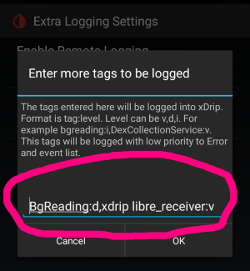
- Jei reikia, įveskite “BgReading:d,xdrip libre_receiver:v” ties Less Common Settings->Extra Logging Settings->Extra tags for logging. Taip bus įrašomi papildomi klaidų pranešimai trikčių šalinimui.
- xDrip+ eikite į Settings > Interapp Compatibility > Broadcast Data Locally ir pasirinkite On.
- xDrip+ eikite į Settings > Interapp Compatibility > Accept Treatments ir pasirinkite Off.
- to enable AAPS to receive blood sugar levels (version 2.5.x and later) from xDrip+ please set Settings > Interapp Settings > Identify Receiver “info.nightscout.androidaps”
*Jei norite naudotis AndroidAPS kalibracijoms, xDrip+ eikite į Settings > Interapp Compatibility > Accept Calibrations ir pasirinkite On. Taip pat galbūt norėsite peržiūrėti kalibravimo parinktis Nustatymuose > Mažiau įprasti nustatymai > išplėstinės kalibravimo parinktys.
3 žingsnis: aktyvuokite jutiklį
xDrip+ aktyvuokite sensorių paspausdami “Start Sensor” ir pasirinkdami “not today”.
In fact this will not physically start any Libre2 sensor or interact with them in any case. Tai tiesiog nurodo xDrip+’ui, kad naujas sensorius siunčia kraujo gliukozės lygius. Jei galite, įveskite dvi reikšmes, gautas iš gliukomačio, pradinei kalibracijai. Dabar kraujo gliukozės reikšmės turėtų būti rodomos xDrip+ kas 5 minutes. Praleistos reikšmės, pvz. nes buvote per toli nuo telefono, negali būti įrašytos atbuline data.
After a sensor change xDrip+ will automatically detect the new sensor and will delete all calibration data. You may check you bloody BG after activation and make a new initial calibration.
Step 4: Configure AndroidAPS (for looping only)
- AndroidAPS eikite į Konfigūratorių>KG šaltinis ir pažymėkite xDrip+
- If AndroidAPS does not receive BG values when phone is in airplane mode, use Identify receiver as describe on xDrip+ settings page.
Kol kas naudojant Libre 2 kaip KG šaltinį, negalite aktyvuoti ‘Įjungti SMB visada’ ir ‘Įjungti SMB po angliavandenių’ per SMB algoritmą. KG reikšmės Libre 2 nėra pakankamai tikslios, norint saugiai naudoti šias funkcijas. Žiūrėkite “Lyginti kraujo gliukozės duomenis <../Usage/Smoothing-Blood-Glucose-Data-in-xDrip.html>`_, jei norite sužinoti daugiau.
Patirtis ir gedimų šalinimas
Connectivity
The connectivity is extraordinarily good. With the exception of Huawei mobile phones, all current smartphones seem to work well. The reconnect rate in case of connection loss is phenomenal. Ryšys gali nutrūkti, jei mobilusis telefonas yra kišenėje, esančioje priešingoje pusėje nei jutiklis arba, jei esate lauke. Kai aš sode, nešioju telefoną toje pačioje pusėje kur ir jutiklis. In rooms, where Bluetooth spreads over reflections, no problems should occur. Jei jūs turite ryšio problemų, išbandykite kitą telefoną. It may also help to set the sensor with the internal BT antenna pointing down. The slit on the applicator must be pointing down when setting the sensor.
Value smoothing & raw values
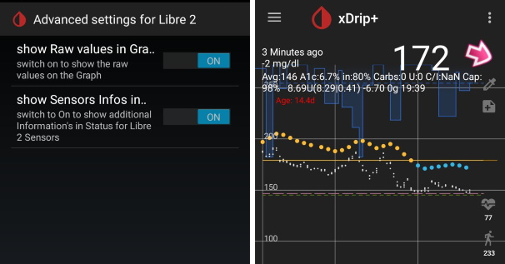
Techniškai, esama kraujo gliukozės reikšmė yra perduodama xDrip+ kiekvieną minutę. Svertinio vidurkio filtras apskaičiuoja išlygintą reikšmę per pastarąsias 25 minutes. Tai privaloma naudojant uždarą ciklą. Kreivės atrodo sklandžiai ir ciklo rezultatai yra puikūs. Neapdorotos reikšmės, kuriomis aktyvuojami aliarmai, šiek tiek šokinėja, tačiau atitinka reikšmes skaitytuve. Be to, neapdorotos reikšmės gali būti rodomos xDrip+ grafike, kad būtų galima sureaguoti laiku į staigius pokyčius. Įjunkite Less Common Settings > Advanced Settings for Libre2 > “show Raw values” ir “show Sensors Infos”. Then the raw values are additionally displayed as small white dots and additional sensor info is available in the system menu.
The raw values are very helpful when the blood sugar is moving fast. Even if the dots are jumpier you would detect the tendency much better as using the smoothed line to make proper therapy decisions.
Sensor runtime
Jutiklio naudojimo trukmė yra nustatyta 14 dienų. 12 papildomų valandų kaip Libre1 nebėra. xDrip+ shows additional sensor information after enabling Advanced Settings for Libre2 > “show Sensors Infos” in the system menu like the starting time. Likęs jutiklio laikas taip pat gali būti matomas modifikuotoje LibreLink programėlėje. Arba pagrindiniame ekrane rodomos likusios dienos arba jutiklio pradžio laiką rasite trijų taškų meniu->Help->Event log ties “New sensor found”.
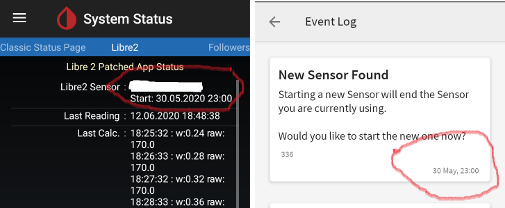
New sensor
Jutiklio keitimas vyksta nepertraukiamai: uždėkite naują jutiklį šiek tiek prieš aktyvavimą. Kai tik xDrip+ nebegaus duomenų iš seno jutiklio, aktyvuokite naują jutiklį su modifikuota programėle. Po vienos valandos naujos reikšmės turėtų automatiškai atsirasti xDrip+’e.
Jei ne, patikrinkite telefono nustatymus ir darykite taip, kaip su pirmuoju. Neturite laiko apribojimų. Try to find the correct settings. Nėra reikalo iš karto keisti jutiklį, kol nepabandėte skirtingų derinių. Jutikliai yra atkaklūs ir nuolat bando užmegzti ryšį. Neskubėkite. In most cases you accidentally changed one setting which causes now problems.
Pavykus, prašome xDrip’e pasirinkti “Sensor stop” ir “Delete calibration only”. Tai nurodo xDrip’ui, kad naujas jutiklis siunčia naujus gliukozės kraujyje duomenis ir senos kalibaracijos daugiau netinkamos, todėl turi būti ištrintos. Čia nėra daroma jokios realios sąveikos su Libre2 jutikliu! You do not need to start the sensor in xDrip+.
Kalibravimas
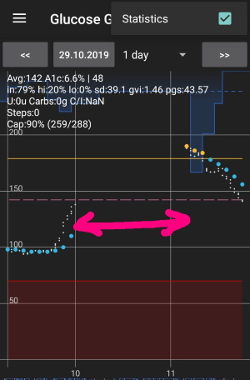
You can calibrate the Libre2 with an offset of -40 mg/dl to +20 mg/dL [-2,2 mmol/l to +1,1 mmol/l] (intercept). The slope isn’t changeable as the Libre2 is much more accurate compared to the Libe1. Please check by fingerpricking early after setting a new sensor. It is known that there can arise big differences to the blood measurements. Norint saugiai jaustis, kalibruokite kas 24-48 valandas. Reikšmės yra tikslios iki pat jutiklio pabaigos ir nešokinėja taip kaip Libre1. Tačiau, jei jutiklis rodo visiškai netiksliai, tai nepasikeis. Tada jutiklis turėtų būti nedelsiant pakeistas.
Plausibility checks
Libre2 jutikliai turi patikimumo patikrinimus, siekiant nustatyti blogas reikšmes. Kai tik jutiklis pajuda ant rankos ar yra šiek tiek pastumiamas, reikšmės gali pradėti svyruoti. Libre2 jutiklis tada išsijungs saugumo sumetimais. Deja, skenuojant su programėle, atliekami papildomi tikrinimai. Programėlė gali deaktyvuoti jutiklį, net jei su jutikliu viskas yra gerai. Currently the internal test is too strict. Aš visiškai nustojau skenuoti ir nuo tada neturėjau sutrikimų.
Time zone travelling
In other time zones there are two strategies for looping:
Either
- nekeisti išmaniojo telefono laiko ir pastumti bazės profilį (telefonas skrydžio režimu) arba
- ištrinti pompos istoriją ir pakeisti telefono laiką į vietinį.
- būdas yra geras iki tol, kol nereikia keisti Libre2 jutiklio į naują. Jei abejojate, pasirinkite metodą 2., ypač, jei kelionė trunka ilgiau. Jei aktyvuojate naują jutiklį, automatinė laiko juosta turi būti nustatyta, taigi 1. metodas netinka. Prašome patikrinti tai prieš kelionę, kitaip galite greitai turėti problemų.
Experiences
Apskritai, tai yra viena iš mažiausių NGJ sistemų rinkoje. Maža, nereikia siųstuvo ir dažniausiai labai tikslūs duomenys be svyravimų. After approx. 12 hours running-in phase with deviations of up to 30 mg/dl (1,7 mmol/l)the deviations are typical smaller than 10 mg/dl (0,6 mmol/l). Geriausi rezultatai būna užpakalinėje žąsto pusėje, kitur - atsargiai! Nėra būtinybės įdurti naują jutiklį dieną prieš “įmirkymui”. That would disturb the internal leveling mechanism.
Karts nuo karto pasitaiko blogų jutiklių, rodančių dideliu skirtumu palyginus su kraujo rodikliais. Taip būna. Tokie turėtų būti nedelsiant pakeisti.
Jei jutiklis šiek tiek pasislinko ant odos ar buvo pastumtas, tai gali sąlygoti neteisingus rezultatus. Siūlelis, esantis audinyje, šiek tiek ištraukiamas iš audinio ir tada matuoja skirtingus rezultatus. Mostly probably you will see jumping values in xDrip+. Arba bus skirtumas su rodikliais iš piršto. Prašome nedelsiant pakeisti jutiklį! Rezultatai dabar yra netikslūs.
Using bluetooth transmitter and OOP
Bluetooth transmitter can be used with the Libre2 with the latest xDrip+ nightlys and the Libre2 OOP app. You can receive blood sugar readings every 5 minutes as well as with the Libre1. Please refer to the miaomiao website to find a description. This will also work with the Bubble device and in the future with other transmitter devices. The blucon should work but has not been tested yet.
Old Libre1 transmitter devices cannot be used with the Libre2 OOP. They need to be replaced with a newer version or have a firmware upgrade for proper operation. MM1 with newest firmware is unfortunately not working yet - searching for root cause is currently ongoing.
The Libre2 OOP is creating the same BG readings as with the original reader or the LibreLink app via NFC scan. AAPS with Libre2 do a 25 minutes smoothing to avoid certain jumps. OOP generates readings every 5 minutes with the average of the last 5 minutes. Therefore the BG readings are not that smooth but match the original reader device and faster follow the “real” BG readings. If you try to loop with OOP please enable all smoothing settings in xDrip+.
The Droplet transmitter is working with Libre2 also but uses an internet service instead. Please refer to FB or a search engine to get further information. The MM2 with the tomato app also seems to use an internet service. For both devices you have to take care to have a proper internet connection to get your BG readings.
Even if the patched LibreLink app approach is smart there may be some reasons to use a bluetooth transmitter:
- the BG readings are identical to the reader results
- the Libre2 sensor can be used 14.5 days as with the Libre1 before
- 8 hours Backfilling is fully supported.
- get BG readings during the one hour startup time of a new sensor
Remark: The transmitter can be used in parallel to the LibreLink app. It doesn’t disturb the patched LibreLink app operation.
Remark #2: The OOP algorithm cannot be calibrated yet. This will be changed in the future.